Agile Store Locator Plugin 5.1.3 – Powerful Store Locator (Google Maps) For WordPress

Introduction
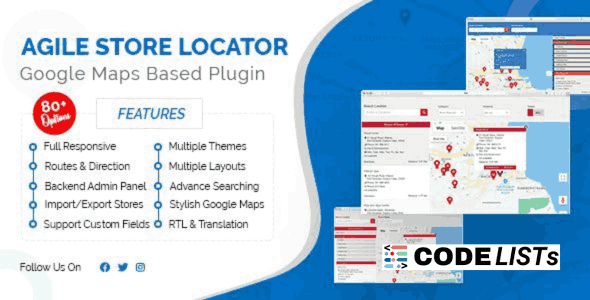
Managing multiple store locations or physical branches on your WordPress website can be a challenging task. Whether you are running a retail chain, a restaurant franchise, or a real estate agency, providing an intuitive and user-friendly store locator is essential for your customers. The Store Locator (Google Maps) For WordPress 5.1.3, also known as Agile Store Locator, is a premium WordPress plugin designed to make your store-finding experience seamless and professional.
Agile Store Locator offers a wide range of features, from customizable markers to powerful analytics. The plugin ensures your visitors can find your locations with ease while providing you with insightful data about user interactions, searches, and popular stores.
Key Features of Agile Store Locator Plugin
1. Add Markers with Each Category
Agile Store Locator allows you to add multiple markers on your map. You can assign each marker to a category or use the default marker style. This feature is ideal for stores with different departments, franchises, or services, giving your users a visually organized map.
2. Full Width Interactive Google Maps
The plugin offers a full-width interactive Google Map template that can be embedded anywhere on your site. Users can pan, zoom, and interact with the map to quickly locate stores near them. This full-width design ensures a modern, responsive look that fits perfectly with any WordPress theme.
3. Customizable Info Windows
One of the unique features of Agile Store Locator is its Info Window customization. You can personalize the content displayed when users click on a marker, including store details, opening hours, contact information, images, and links to your pages.
4. GeoLocation Support
The plugin includes a Prompt Location dialog to ask users for their current location. This ensures accurate store suggestions based on proximity. A second dialog can request users to input their default location if your site is not using SSL.
5. Multiple Layouts & Accordion Options
Agile Store Locator comes with multiple layouts, including list views, grids, and accordion templates. You can organize stores hierarchically by country, state, city, or category. This flexibility makes it suitable for large networks of stores, franchises, and real estate listings.
6. Marker Management & Clustering
For websites with a large number of markers, the plugin supports marker clustering to prevent clutter and improve user experience. The Marker Manage Panel allows you to easily add, edit, or remove markers and categories.
7. Analytics & Reporting
Track user interactions and store popularity with the built-in Analytics Bar Chart. You can see the most searched locations, top stores, and user search trends. These insights help optimize your business strategy and marketing efforts.
8. Category Assignment & Logo Management
Assign multiple categories to a single store and manage store logos via the Logo Management Panel. This is ideal for businesses with stores offering multiple services or product types.
9. Extra Templates
The plugin comes with five beautiful frontend themes and additional templates for deals websites and real estate listings, enabling you to showcase offers, properties, and promotions attractively.
10. Time Management & Duplicate Stores
Assign operating hours for each store and location with the Time Selection feature. The plugin also allows you to duplicate any store with a single click, saving time for bulk updates.
Benefits of Using Agile Store Locator
-
Enhanced User Experience: Visitors can quickly locate the nearest stores with interactive maps and custom markers.
-
Improved Engagement: Accordion views, search functionality, and Info Window customization make browsing more engaging.
-
Data Insights: Built-in analytics track user searches, store popularity, and location trends.
-
Fully Customizable: Color palettes, multiple templates, and Info Window designs allow seamless integration with your brand.
-
Optimized for Large Networks: Marker clustering, multiple categories, and hierarchical layouts ensure smooth performance even for extensive store lists.
How to Use Agile Store Locator
-
Install the Plugin: Download the plugin from the link below and upload it to your WordPress dashboard.
-
Add Stores: Use the Marker Manage Panel to add your stores with relevant information.
-
Configure Layouts: Choose a map layout or accordion template that suits your website.
-
Customize Info Windows: Edit the content of each marker for better user engagement.
-
Enable Analytics: Monitor searches, popular stores, and user activity through the Analytics Bar Chart.
-
Publish: Embed the map on your website using a shortcode or template placement.
Download
Related Posts
FAQs
Q1. Can I assign multiple categories to a single store?
Yes, Agile Store Locator allows you to assign multiple categories to a single store, making it easy for users to filter by service type or product line.
Q2. Is the plugin responsive and mobile-friendly?
Absolutely! The plugin is fully responsive and works seamlessly on mobile devices, tablets, and desktops.
Q3. Can I display custom deals or real estate listings on the map?
Yes, the plugin provides extra templates for deals websites and real estate listings, allowing you to highlight offers or properties.
Q4. Does it support analytics for user interactions?
Yes, Agile Store Locator includes an Analytics Bar Chart that tracks searches, top stores, and popular locations.
Q5. Can I duplicate stores easily?
Yes, you can duplicate any store with a single click to save time when adding similar entries.
Final Thoughts
The Store Locator (Google Maps) For WordPress 5.1.3 is an essential tool for any business with multiple locations. Agile Store Locator not only enhances user experience with interactive maps and customizable markers but also provides robust analytics to track customer behavior. With multiple layouts, clustering for many stores, and extra templates for real estate and deals, this plugin is ideal for businesses of all sizes looking to improve their online presence and customer engagement.