
Code Snippets Pro WordPress Plugin – Best Safely Manage Custom Code in WordPress (v3.8.2)

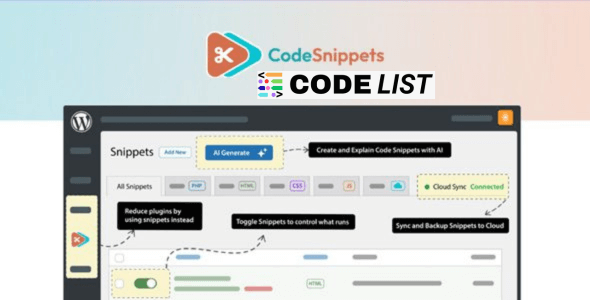
Code Snippets Pro 3.8.2 – WordPress Code Snippets Manager
Introduction
If you’re tired of editing your functions.php file or installing countless small plugins for simple tweaks, the Code Snippets Pro WordPress Plugin is your perfect solution. It allows you to safely add custom code to your WordPress website — without the need for child themes or manual file editing. This professional-grade plugin simplifies code management, making customization faster, safer, and smarter.
Whether you’re a developer or a site owner, Code Snippets Pro WordPress Plugin lets you manage your site’s functionality with efficiency and peace of mind.
Key Features of Code Snippets Pro WordPress Plugin
Let’s explore why Code Snippets Pro WordPress Plugin is one of the most trusted tools for WordPress developers and administrators:
🔹 1. Unlimited Code Snippets
Create, edit, and manage an unlimited number of custom code snippets.
You can easily activate or deactivate them anytime without affecting your site performance.
🔹 2. Import & Export
Easily transfer snippets between sites — perfect for developers managing multiple client projects.
You can even sync snippets across staging, local, and production environments.
🔹 3. Full Code Editor
It includes a syntax-highlighting code editor with live error checking, ensuring that your code is clean and error-free before activation.
🔹 4. Elementor Integration
Display snippets directly on Elementor pages with specialized widgets.
You can even share snippet source codes or embed code examples in your designs.
🔹 5. Grouping with Tags
Organize your snippets by tags or functions. This makes finding and managing snippets incredibly simple.
🔹 6. REST API & WP-CLI Support
Code Snippets Pro WordPress Plugin allows developers to control snippets through the WordPress REST API or via the WP-CLI command line, enabling complete automation.
🔹 7. Cloud Backup & Sync
Store all your snippets securely in the CodeVault Cloud.
It allows unlimited private cloud storage, automatic backup, and syncing of all your code snippets.
🔹 8. Safe Customization
Forget about editing core files or themes — you can safely run custom PHP, HTML, CSS, and JavaScript snippets without risking your site.
🔹 9. Snippet Display Options
Display your snippets as source code blocks for visitors using the WordPress block editor or Elementor widget.
🔹 10. Developer Friendly
The plugin includes third-party integration support for Dynamic.ooo, ManageWP, and many others — with more integrations continuously added.
Benefits of Using Code Snippets Pro
Here’s how Code Snippets Pro WordPress Plugin can transform your WordPress workflow:
✔️ Simplify Development:
Add functionality directly through snippets instead of installing dozens of plugins.
✔️ Increase Security:
Your code runs safely without editing core WordPress files.
✔️ Cloud Sync Safety:
Automatically backup and sync snippets — never lose your code again.
✔️ Performance Optimization:
Lightweight structure ensures zero slowdown on your website.
✔️ Collaboration Ready:
Ideal for agencies and developers managing multiple projects.
How to Use Code Snippets Pro WordPress Plugin
Follow these easy steps to get started:
-
Install & Activate the plugin.
-
Navigate to Snippets → Add New in your WordPress dashboard.
-
Enter your snippet title and code in the editor.
-
Choose the execution type (e.g., Frontend, Admin, or Everywhere).
-
Click Save & Activate — and you’re done!
-
Optionally, sync your snippet with the CodeVault Cloud for backup.
It’s that easy — no need to touch your theme files again.
Comparison: Code Snippets Pro vs. Free Version
| Feature | Code Snippets Free | Code Snippets Pro |
|---|---|---|
| Cloud Backup | ❌ No | ✅ Yes |
| Elementor Integration | ❌ No | ✅ Yes |
| WP-CLI Commands | ❌ No | ✅ Yes |
| REST API Access | ❌ No | ✅ Yes |
| Private Snippet Library | ❌ No | ✅ Yes |
| Unlimited Storage | ❌ No | ✅ Yes |
| Developer Support | ❌ Community Only | ✅ Priority Support |
Verdict: The Pro version is worth every penny for developers who value safety, automation, and flexibility.
Download Section
⚡ Download Code Snippets Pro WordPress Plugin (v3.8.2)
⚠️ Note: Hang on a second. Your direct link is being generated. We do not give any guarantee if any theme/plugin/script contains a virus. Please check on VirusTotal before using it on localhost.
Frequently Asked Questions (FAQs)
1. What is Code Snippets Pro WordPress Plugin used for?
It allows you to safely run custom PHP, CSS, JS, or HTML code on your WordPress website without editing theme or core files.
2. Can I use Code Snippets Pro with Elementor?
Yes! It comes with built-in Elementor widgets to embed snippets directly on pages.
3. Is it safe to use Code Snippets Pro?
Absolutely. It includes live error checking and safe execution modes to prevent site crashes.
4. Does it support cloud storage?
Yes, it offers unlimited private cloud storage via CodeVault for syncing and backups.
5. Can I migrate my snippets to another website?
Yes, you can easily import/export snippets between different WordPress installations.
Final Thoughts
The Code Snippets Pro WordPress Plugin is more than just a tool — it’s a complete system for managing and executing custom code safely.
Instead of installing multiple plugins for every small feature, you can write and organize your own code efficiently.
With cloud sync, Elementor integration, and API automation, Code Snippets Pro WordPress Plugin truly represents the next generation of smart WordPress customization.
Related Posts